Built by the people that do the work not watch it

Get paid what you flag.

Finally, an app aimed right at the workers from the same people that deal with same problems every shop deals with. Start at your hours. You flag them on your phone and that info goes nowhere else.

On TestFlight now · internal testers since Sep 29, 2026 · public link coming
3versions, one app
0customer details stored
92automatic checks on every change
100%on your phone, no account needed
How it works

It’s yours! It’s up to you to add as much or as little amount of info as you want. The more you add the more it can do. Like automatic labor hour conversions, efficiency tracking, material tracking and even more to come!

01

Scan the estimate

Use the phone’s scanner on the back page is usually all it needs. The labor hours and the small line operations that always end up on the body side.

02

Catch the conversions

Car cover, mask jambs, rope glass, mask for primer, etc. The scanner catches them and converts them.

03

Know the week

Flagged hours vs clock hours running all week, even set a goal if you want. Finally you can walk into payroll and already know your hours!

Pick your version

One version picked just once. On first open it asks you to pick which one. After you enter your version that’s what installs with no interference from the others in the way. Get only what you need.

Painter

Scan it, flag it, track the week.

  • Estimate scanner with labor conversions
  • Complete job logs to track your week/month - throw away pencil & paper
  • Time clock for the day and on the job to track efficiency however close you want
  • Set a goal for the week, month even the year. It will even track your records
  • Coming soon Plan my work feature gives you the most efficient game plan to get it done
  • Coming soon paint database for every manufacturer that will even be able to give tips for tinting, blending, 3-stage process
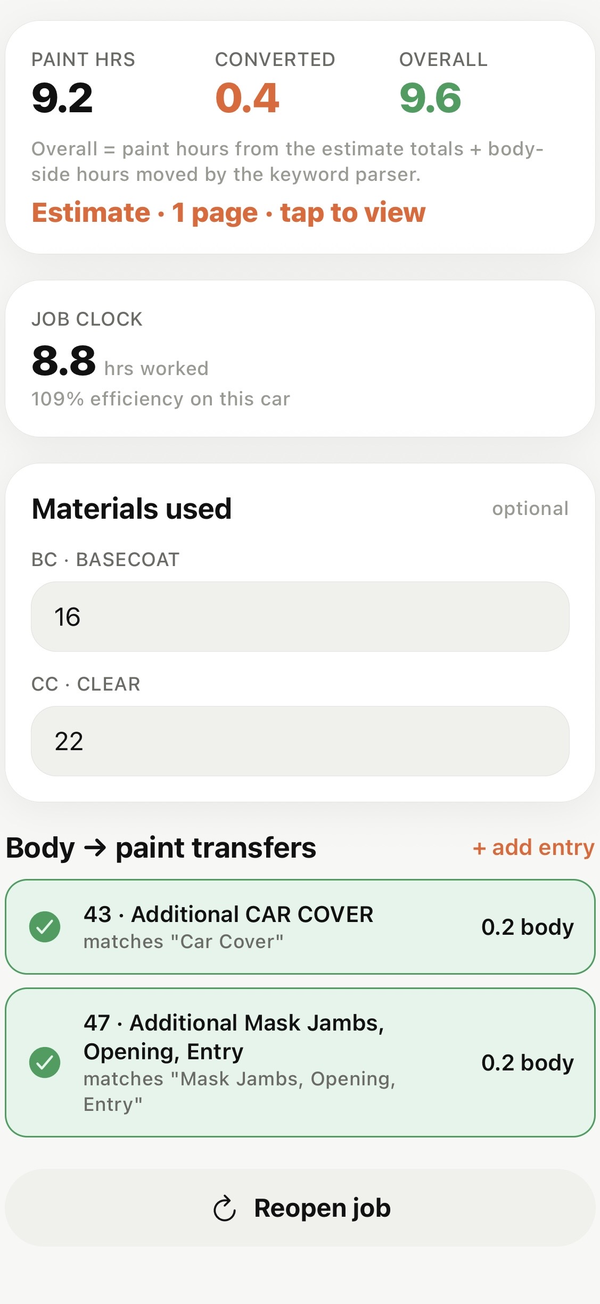
A painter job on Lou's phone: 9.2 paint hours, 0.4 converted, 9.6 overall
Body Tech

Your board, your split.

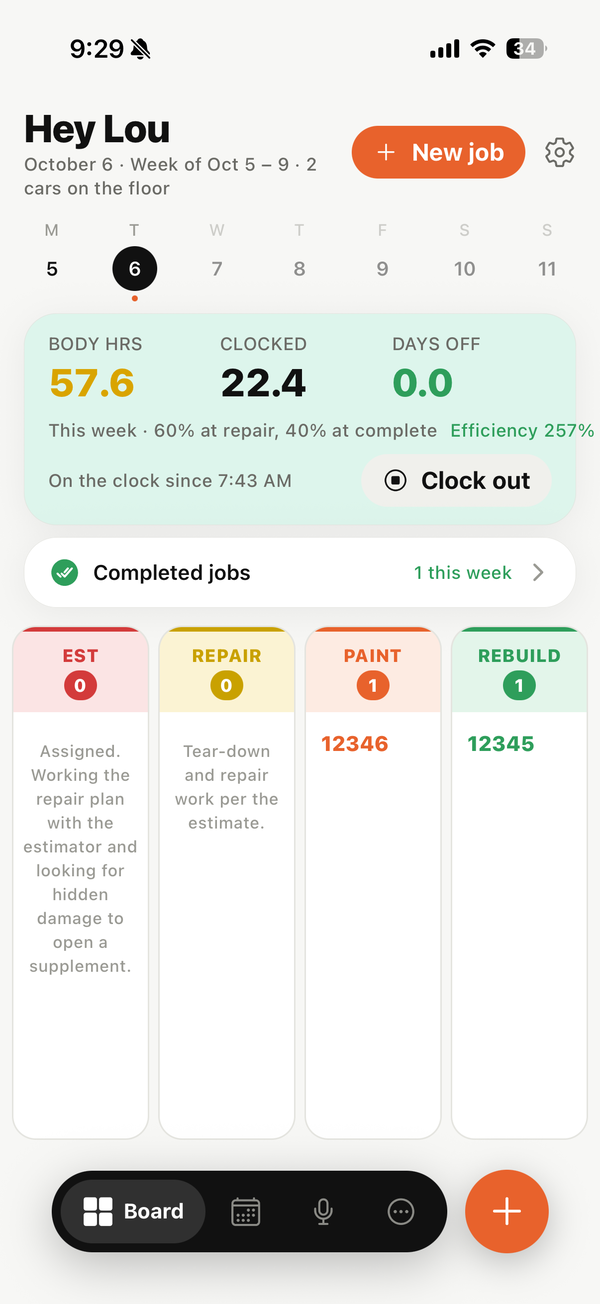
  • Four columns in phases - Estimate, Repairs, In Paint, Reassembly
  • Drag n drop jobs into next column when ready.
  • Hours split 60/40 by default but change to however you need. In paint pays 60 complete reassembly pays the rest
  • Supplements by pic with one line description and hours needed
  • Scan your parts list and track as little or as much as you want
  • Shop sync coming - send supplements straight to estimator and get approval right back, get notified when painters roll the car out of booth
  • Also coming - stuck on getting out a door handle? Take a pic ask a question get an answer
The body tech board on Lou's phone
Hourly

Clock in. See the week.

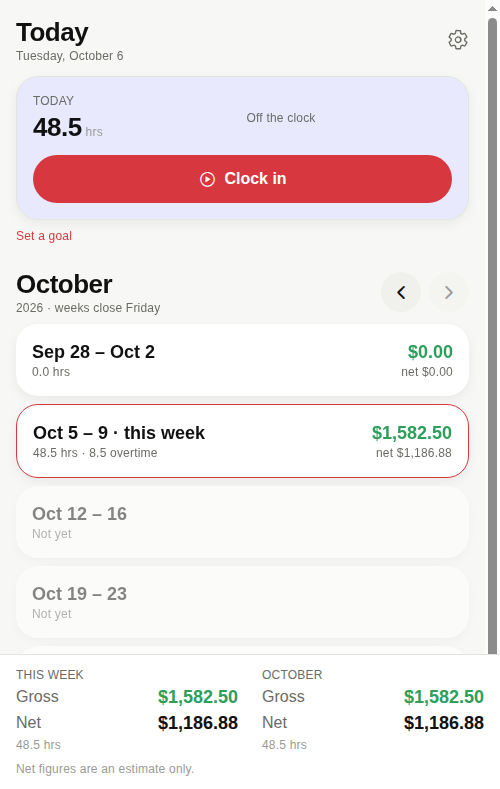
  • One button to clock in and out
  • Fix a punch when you forgot
  • Overtime past 40, priced the way your shop pays
  • Gross and a net estimate from your take-home
  • Clock reminders at your usual start and stop
The hourly home: 48.5 hours with 8.5 overtime, $1,582.50 gross, $1,186.88 net
Where it stands

Built, in testing, planned.

Updated October 6, 2026. Nothing on this board is a promise with a date; it is what exists and what is next.

Built

In the app
  • Estimate readerCamera or PDF, on-device OCR, every labor line, body-to-paint conversions, a check screen before anything saves.
  • Three versions, locked per phonePainter, Body Tech, Hourly. Picked once at first open.
  • Body tech boardStage moves, hour posts at your split, due dates, parts, supplements.
  • Hourly payClock, punches, overtime, gross and net.
  • Week, month, goals, days offTotals by week, efficiency, best week and month.
  • Estimates leave when the week is paidPages and text deleted, the numbers stay.
  • First-run helpThree cards in your version's words.

In testing

TestFlight
  • Real shop, real jobsRunning daily in a Philadelphia collision shop since September 29.
  • Body tech runA working body tech takes the board through a week and sends notes.
  • Public TestFlight linkWaiting on Apple's developer account paperwork. Join the list and you hear the day it opens.
  • Reader on more layoutsCCC and Audatex sheets from more shops. Send one with the customer block covered and it gets added.
Privacy

Your hours are yours. The customer's details are nobody's.

Every scan goes through a check screen that strips the customer block before anything is saved, and tells you how many items it removed. Once a job is closed and the week is paid, the estimate pages and text are deleted from the phone. The hours stay.

No account. No upload. Nothing leaves the phone unless you turn on cloud backup later, and that will be stated plainly before it is turned on.

Removed at scan

  • Customer, owner and insured names
  • Phone numbers and email addresses
  • Street addresses
  • Insurance, claim and policy numbers
  • License plates
  • Adjuster and estimator names

Kept for you

  • Repair order number
  • Year, make, model, color, paint code
  • Every labor and parts line
  • The totals block
  • Your hours, posts and totals, for good
TestFlight

Not in the store yet. Get on the list.

uFlag is being tested on real jobs right now. If you flag hours for a living and want in on the next TestFlight round, leave your email. You hear from a person, and only about uFlag.

iPhone first. No spam, no selling the list, ever.